

A photo library gives a mobile app access to something unusually personal. It can contain family moments, work documents, location clues and pictures someone would struggle to replace. Helping organise that library means handling both sensitive information and decisions with lasting consequences.
Lumo is DuniaOps’s own photo application, available on iPhone and iPad. It helps people compare similar photographs, choose the frames they want to keep, review removals and find prepared photos again. This is a first-party account of the product and its engineering, rather than a client delivery story.

For a business commissioning a mobile app, Lumo provides a concrete way to examine three questions: where does sensitive processing happen, who controls the result, and what happens when an action could remove something valuable?
Define the boundary around sensitive processing
Lumo performs photo analysis and indexing on the device. The project’s search implementation uses Apple’s Vision framework for image classification and recognising visible text. Those observations contribute to a local catalogue that helps people find photographs by what they remember about them.
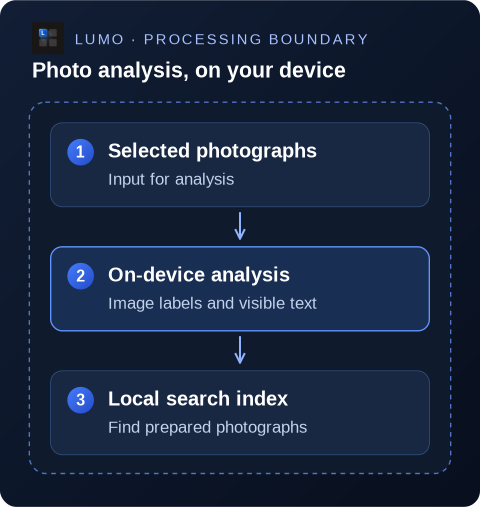
Photo-analysis flow, simplified from the project implementation. Optional service connections are separate from this diagram.
The important boundary is specific: photographs are not uploaded for this analysis. That describes the data path for a particular operation. It does not imply that every feature in the application works without a connection. Lumo’s privacy policy separately explains purchases, sharing and optional place lookup.
For another mobile product, the useful starting point is to name each operation and its inputs. A search feature might need a local label; a payment needs a transaction; an export needs the selected output. Treating these as separate flows makes it easier to explain what leaves the device and to review whether that transfer is necessary.
Device-side processing also leaves engineering work to do. A local index has a lifecycle, consumes storage and needs a way to be rebuilt. In Lumo’s project, the search catalogue is rebuildable data. Clearing that catalogue and removing an original photograph are separate responsibilities. Keeping that distinction explicit makes maintenance actions easier to reason about.
Give recommendations a clearly limited role
Lumo can recommend a frame using technical image quality, while the user chooses which photographs to keep. They can choose a different favourite or retain several images from the same group.
A technically sharper photograph cannot settle which moment matters most. Someone may value a particular expression or want several frames for different purposes. An application can help compare the options while leaving that judgement with the person who understands the context.
This gives a mobile team a useful acceptance question: can the user make a reasonable choice that differs from the recommendation? A review interface needs to support that choice directly. Showing a suggested result is only part of the workflow; selecting alternatives and understanding the current selection matter too.
The same question applies to business tools that suggest a document category, prioritise a work item or flag a possible duplicate. The scope of the recommendation should be clear enough for someone to accept or correct it.
Make removal an explicit decision
Photo organisation has a consequential transition: moving from reviewing suggestions to removing assets. Lumo asks the user to confirm removals, and Photos library deletions use the system’s Photos workflow and Recently Deleted recovery route.
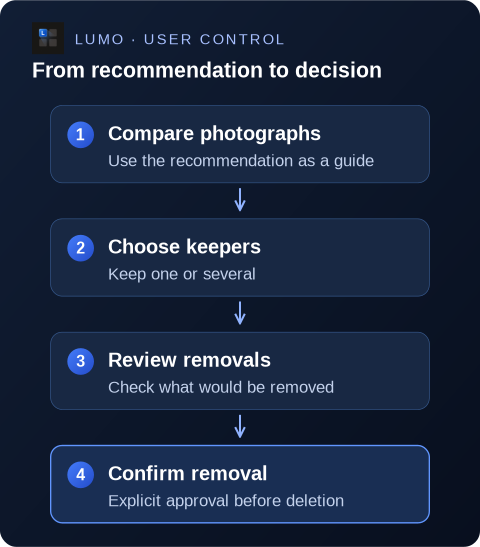
A simplified review flow. Reviewing a recommendation does not itself authorise removal; this diagram is an explanation rather than an app screen.
The project source also shows explicit removal operations and confirmation state, with regression tests for a selection containing no keepers. That edge case matters: zero selected photographs still needs a defined, understandable outcome. Reviewing a selection should not leave the meaning of the next action ambiguous.
For an app handling valuable records, the review should cover more than a successful demonstration. What can the person see before confirming? Can they cancel? Does the interface distinguish the selection from the items proposed for removal? What recovery mechanism actually applies to that storage system?
These are practical questions for product design and testing. A confirmation dialogue is one part of the answer; the preceding selection, the operation itself and the resulting state need to agree.
Explain optional connections at the point of use
Local processing and optional network features can coexist, provided their boundaries are explained accurately. Lumo’s documented place-lookup flow asks for a choice before using Apple’s geocoding service. The policy describes the limited place information involved and the local search capabilities that remain available if the person declines.
That is a more useful level of explanation than asking someone to interpret a broad privacy slogan. It ties a decision to a purpose: what information is needed, which service receives it and what happens without that connection.
For a commissioned application, this can become a straightforward review exercise. Take each optional connection in turn and follow it through the interface, implementation and privacy explanation. The description should match the operation people are actually being offered.
Keep the case study within the evidence
Lumo is a real DuniaOps product with a public App Store listing. It provides concrete material for discussing data boundaries, user judgement and consequential actions. This account does not establish a quantified improvement in review speed, recommendation accuracy or commercial results. Those would require their own measurements.
The useful proof is more specific: a working product has identifiable processing boundaries, a defined role for recommendations and a removal workflow that can be examined in detail. For someone selecting a development partner, those details create better questions than a list of technologies alone.
Apply the same questions to your mobile project
Before committing to a feature list, identify the sensitive inputs, the decisions an app will suggest and the actions that change or remove data. Then walk through an ordinary use case, a declined permission and a cancelled operation. Each should have an outcome the team can explain and test.
Our Mobile App Development service is the starting point for discussing an iOS or mobile product with those constraints. If you have a workflow in mind, tell us about the project, including the data it handles and the decisions people need to remain in control of.